Keyboard shortcuts
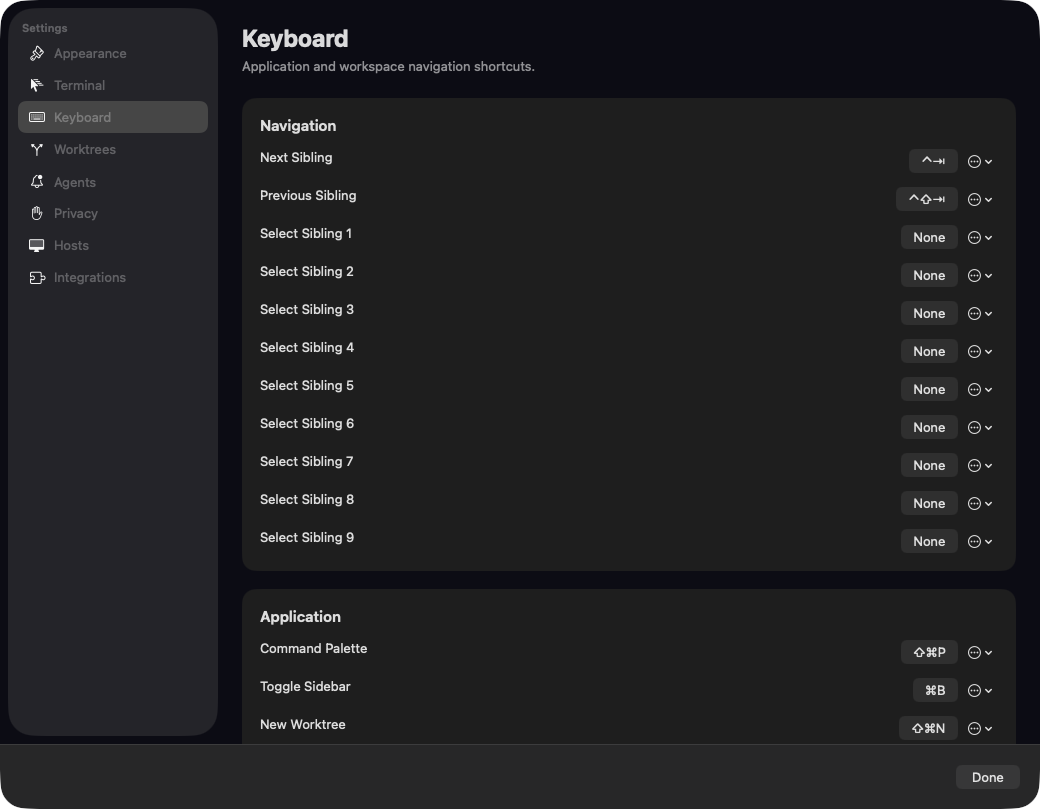
Ghosthub keeps application navigation separate from the shortcuts owned by tmux, Herdr, and programs running inside the terminal. Open Settings → Keyboard to record, clear, or restore a Ghosthub shortcut.
Default navigation
| Action | Shortcut |
|---|---|
| Next sibling | Ctrl+Tab |
| Previous sibling | Ctrl+Shift+Tab |
| Previous native window tab | ⌘⇧[ |
| Next native window tab | ⌘⇧] |
| Native window tab 1–8 | ⌘1–8 |
| Last native window tab | ⌘9 |
Sibling navigation is local to what you are currently using:
- A worktree cycles through visible worktrees in the same project.
- A directory workspace cycles through directory workspaces on the same host.
- A standalone tmux session cycles through visible standalone tmux sessions on the same host.
- A Herdr session cycles through running Herdr sessions on the same host.
- A Zellij session cycles through active Zellij sessions on the same host.
The order matches the sidebar, including custom ordering and visibility settings. At least two eligible siblings must exist. If navigation is not available, Ghosthub leaves the key event untouched so the active terminal can receive it. Stopped Herdr sessions are never started by a navigation shortcut.
Numbered sibling actions 1–9 are available in Settings but are unbound by default. When those keys are otherwise unbound, ⌘1 through ⌘8 select native tabs and ⌘9 selects the last native tab. If the requested tab number is beyond the end of a short tab group, Ghosthub selects that group's last tab. An explicit Ghosthub shortcut assignment takes precedence, so you can use Command-number for numbered sibling navigation instead.
Other defaults
| Action | Shortcut |
|---|---|
| Open Command Palette | Shift+Cmd+P |
| Hide or show the sidebar | Cmd+B |
| Create a worktree | Shift+Cmd+N |
| Import a pull request | Shift+Cmd+I |
| Split the active tmux or Herdr pane right | Cmd+D |
| Split the active tmux or Herdr pane down | Shift+Cmd+D |
| Reload configuration | Shift+Cmd+, |
| Open application log | Option+Cmd+L |
| Find in the active terminal | Cmd+F |
| Find next, toward older history | Cmd+G |
| Find previous, toward newer history | Shift+Cmd+G |
| Hide the Find bar | Shift+Cmd+F |
New tmux Session, New Herdr Session, and New Zellij Session remain available in menus and the Command Palette but are unbound by default.
Standard macOS commands are fixed rather than configurable in Ghosthub. These include Settings (Cmd+,), New Window (Cmd+N), New Tab (Cmd+T), Close (Cmd+W), Close Window (Shift+Cmd+W), Quit (Cmd+Q), and the usual Edit shortcuts. Numbered native tabs (Cmd+1 through Cmd+9) are fallbacks that yield to explicit Ghosthub shortcut assignments. The Keyboard pane lists both groups for reference.
Closing a presentation, window, or the app detaches from tmux, Herdr, or Zellij. It does not end the session.
Edit a shortcut
In Settings → Keyboard, click a shortcut value and press the new key combination. Press Escape to cancel recording. Use the row menu to Clear an action or Restore Default. Changes remain in the Settings draft and take effect together when Settings closes.
Every configurable binding must contain Command, Control, or Option. Bare keys and Shift-only combinations are rejected because they could intercept ordinary terminal input. Ghosthub also rejects a binding already used by another action or reserved by a fixed macOS command; the recorder shows the conflict inline.
Configure config.toml
Shortcut overrides are also stored in
~/.config/ghosthub/config.toml:
[keyboard.shortcuts]
next-sibling = "ctrl+tab"
previous-sibling = "ctrl+shift+tab"
select-sibling-1 = "cmd+opt+1"
split-right = "none"
A missing action uses its compiled default. Set an action to "none" to leave
it unbound. Names are case-insensitive when read and normalized when Settings
writes them. Supported modifiers are cmd, ctrl, opt, and shift;
supported keys include letters, digits, punctuation, arrows, tab, return,
escape, delete, and f1 through f12.
Configuration validation is atomic. A malformed, duplicate, unsafe, or reserved known binding rejects the complete edit. During a live reload, Ghosthub keeps the last valid shortcut set. If the file is already invalid at launch, Ghosthub uses compiled defaults until it is fixed and reloaded. The Keyboard pane and application log report the error without rewriting the invalid file. Unknown action names are preserved for forward compatibility.
Choose Ghosthub → Reload Configuration after editing the file manually.
Multiplexer ownership
For terminal Find controls, minimum versions, and how searching affects other attached clients, see Find text in a terminal.
Choose File → Split Right or File → Split Down if you prefer menus. Ghosthub asks the active multiplexer to split its focused pane directly, so custom prefixes and key bindings keep working. The shortcuts require a connected terminal with keyboard focus and no open sheet. Tmux requires version 3.4 or newer; Herdr requires version 0.8.0 or newer and a confirmed running session. With older versions, use the multiplexer’s normal split keys. Pane splitting is not available on Windows psmux hosts.
Ghosthub does not configure or replace tmux, Herdr, shell, or terminal-program key bindings. Unmatched and unavailable Ghosthub shortcuts continue through to the active terminal.