Projects, worktrees, and directories
Projects and worktrees add Git context to Ghosthub's ordinary tmux workflow. They are optional.
Ghosthub delegates repository and worktree identity to kwt. Packaged builds use their revision-pinned bundled kwt locally and a matching managed helper on remote macOS or Linux hosts.
Register a project
Start with an existing Git checkout on the target host.
- Expand the local Mac or a remote macOS or Linux host.
- Select the + beside Projects.
- Enter the checkout's absolute path on that host.
- Confirm the registration.
Ghosthub registers that one path through kwt and refreshes inventory. It does not scan the machine or edit kwt configuration itself.
Repositories arranged as a .bare/ directory with sibling worktrees are also
supported. Enter the containing directory or any worktree's path. New worktrees
stay beside the existing ones; the .bare/ directory is not a worktree row.
Ghosthub automatically maintains the managed kwt helper on configured remote macOS and Linux hosts. Before a project or worktree operation, Ghosthub repairs the helper if needed; if repair fails, that operation shows the error without affecting ordinary terminal sessions. Project registration is not yet available for native Windows hosts.
If the SSH destination changes while the Add Project sheet is open, close the sheet and start again so the confirmation applies to the current host.
Find a moved project
When a project folder moves or is renamed, Ghosthub asks kwt to look for its new location among repositories it already knows about. One unambiguous match updates the project automatically. Ghosthub attempts this once while that registration remains unavailable; normal refreshes still notice when the original folder returns.
An unresolved project shows a folder question-mark button beside its name. Other projects and terminal sessions remain usable. Select that button, or Control-click the project and choose Locate Folder…. On this Mac, use Choose Folder… or enter the new absolute path. For a remote host, enter the path on that host. Select the main checkout of the same repository, then select Use Folder.
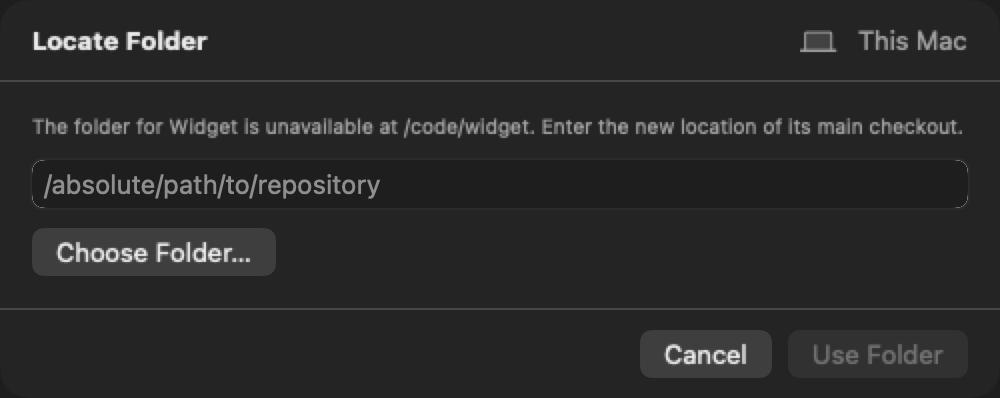
Recovery preserves the registration until it can verify the new location. Automatic matching requires a repository identity; multiple matching clones need an explicit choice. If the project has no stable repository identity, remove its old registration and add its new location. Remove Project… is also available when you no longer want the project listed.
Remove a project
Hover over a project row and select its × control, or Control-click the row and choose Remove Project…. Then confirm the project and host. Ghosthub asks kwt to unregister that project and refreshes inventory. You can remove the registration even if its checkout folder has already been deleted. This does not delete the repository, any worktree directory, or any tmux session. If an imported pull-request worktree still has a live session on its protected tmux server, kill that session before removing the project. Ordinary sessions that remain live are still available under the host's Tmux Sessions group.
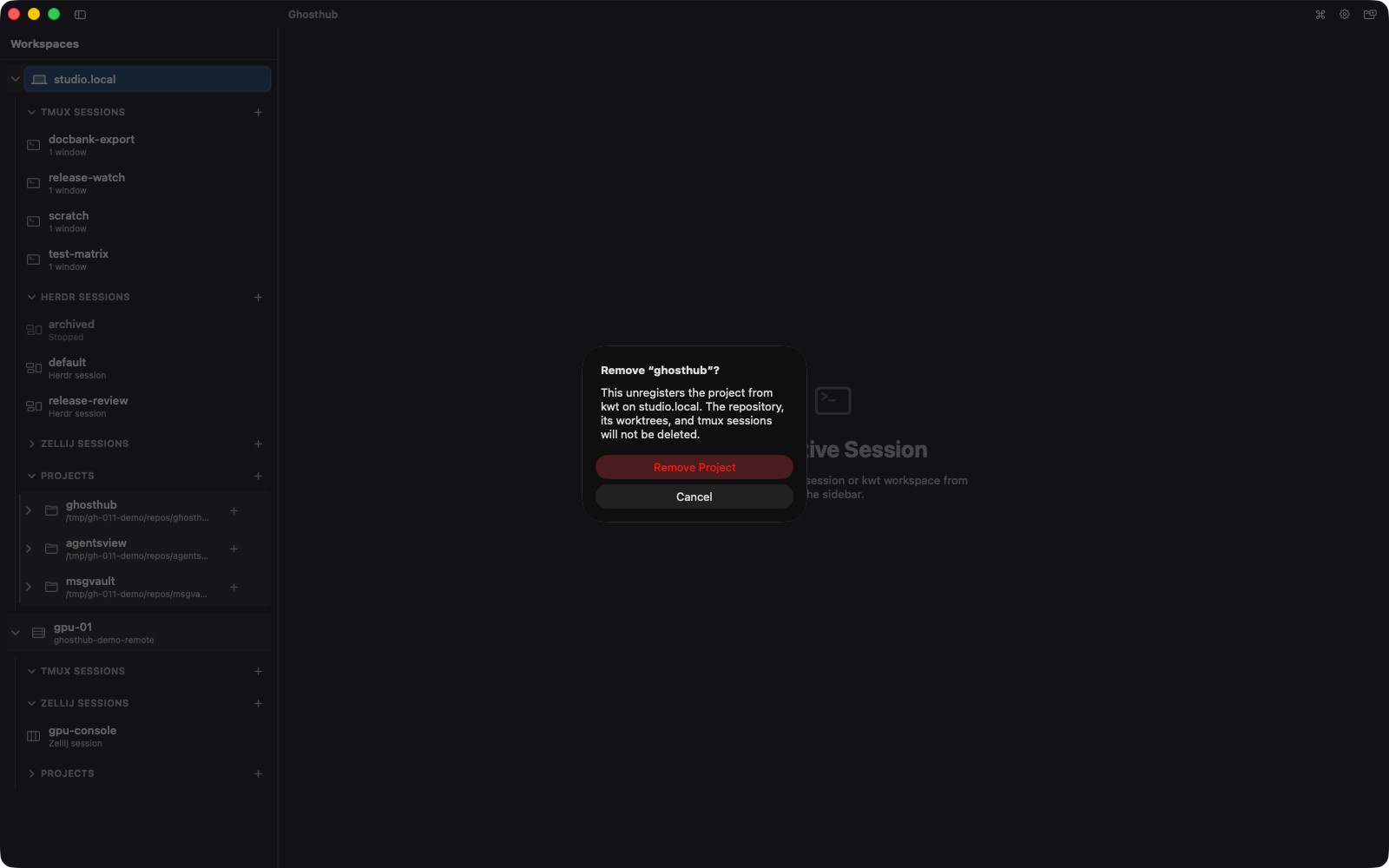
If the project or host connection changes while confirmation is open, Ghosthub stops and asks you to start the removal again. Project removal is available on the local Mac and configured remote macOS or Linux hosts, but not native Windows hosts.
Register a plain directory
A hub, notes tree, or other directory that is not a Git checkout can still use the same kwt layouts and Ghosthub terminal flow. Register it on the target host:
Refresh Ghosthub. The directory appears as one flat row in Projects, after the repository rows. It has no expandable worktree children because one registered directory owns one workspace session.
Select the row to let kwt create or repair its configured layout and attach the
ordinary tmux client. Removing the registration with kwt workspace remove
does not end a live session; after refresh, that session remains available
under Tmux Sessions.
Open a project checkout
Select the project's primary checkout or any linked worktree in the sidebar. Kwt supplies the exact canonical tmux session name. Ghosthub creates or repairs that session when necessary and then attaches an ordinary tmux client. The native window tab and titlebar show the project and worktree names instead of that internal session name. New worktree sessions use kwt's short, hash-suffixed naming format. To list them from a shell, use the kwt-server command. To put the whole project in one new window, right-click the project and choose Open All Worktrees as Tabs. Ghosthub opens the visible worktrees in sidebar order, creating or repairing each Kwt session as needed. If one scene cannot be created, the group stops there instead of opening the remaining worktrees as unrelated windows.
The worktree row shows a compact window count. While Ghosthub is connected, the count refreshes with the existing background activity check: within about five seconds for a working session and twenty seconds for a quiet session. This also covers protected sockets. Detached ordinary sessions use the count from current discovery. A running or agent glyph remains the fallback when no trustworthy count is available, and cached sessions do not remain marked live while the host is unreachable.
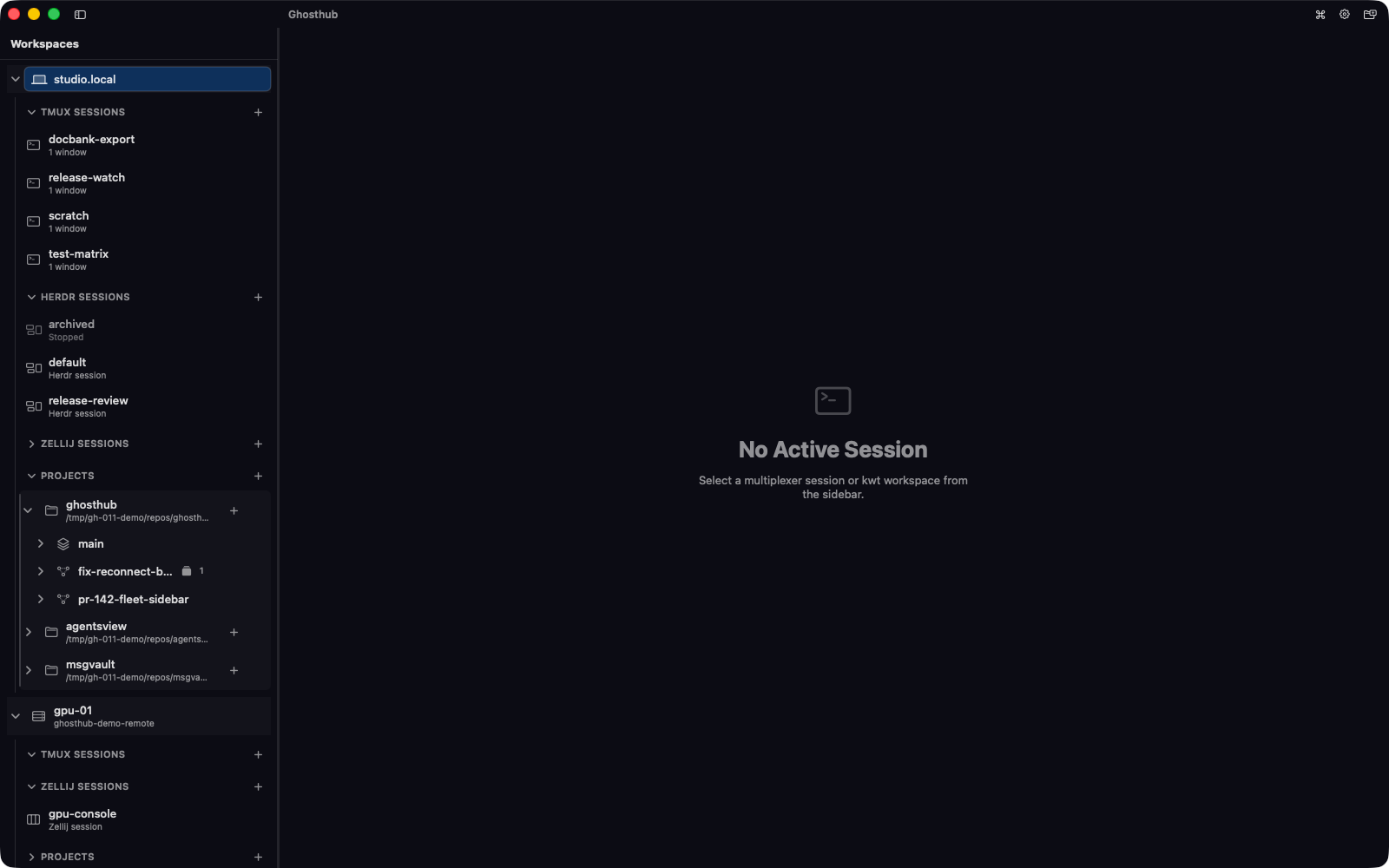
By default, a live kwt-managed session appears only on its worktree row instead of being duplicated under Tmux Sessions. Open Settings → Worktrees and turn off Hide kwt-managed sessions from Tmux Sessions if you want both entries visible.
Inspect changed files
Select the disclosure chevron beside a worktree. The panel expands beneath that worktree without selecting it or attaching its tmux session. More than one worktree can remain expanded.
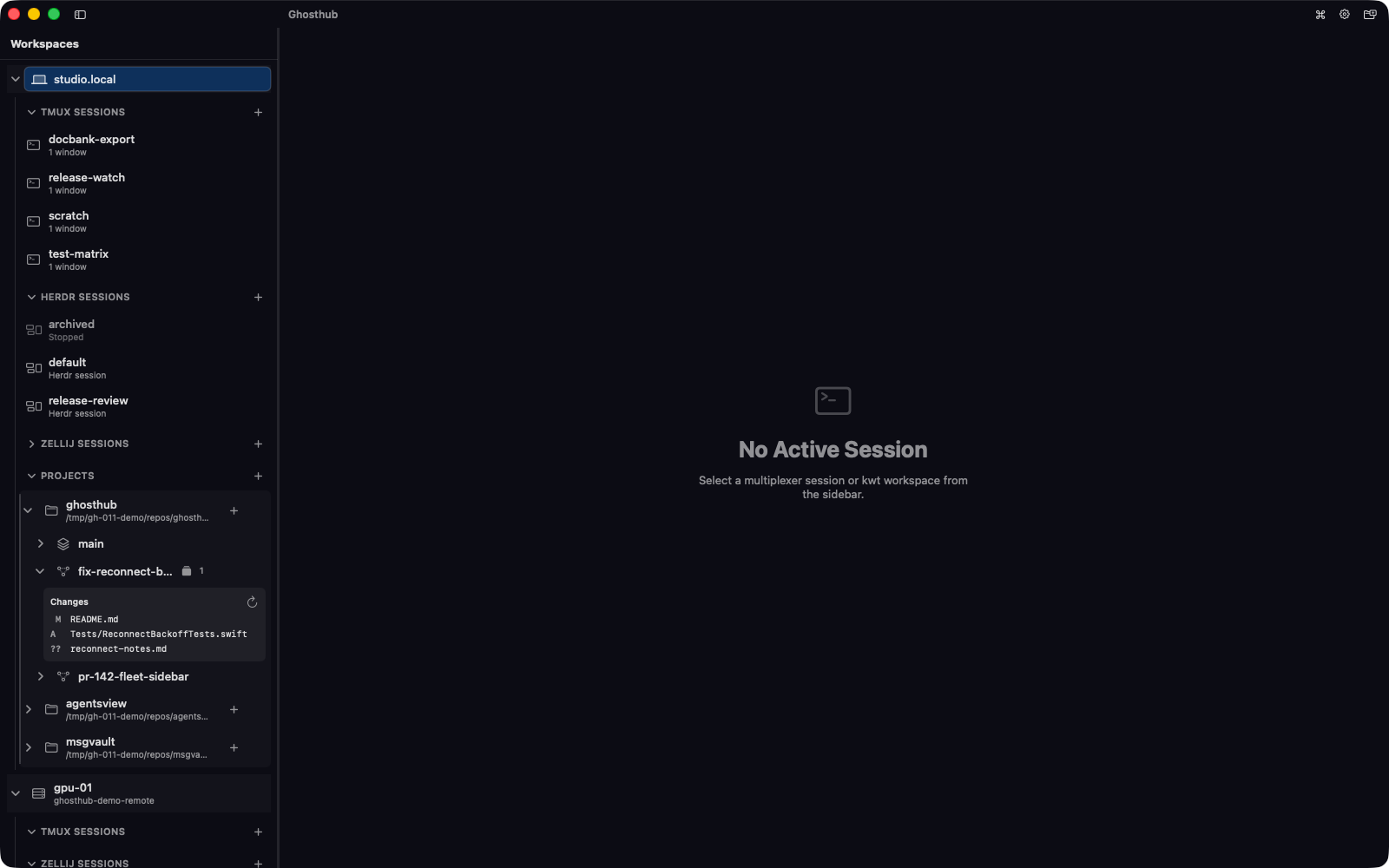
Each file shows separate staged and working-tree states when both apply, and a renamed file includes its original path. An empty panel says No changed files. Large results show the first 200 files; select Show more to reveal the next page. Expanded panels refresh about five seconds after each successful read. Temporary failures retry less frequently when they continue, while a permanent failure waits for Refresh. Use Refresh for an immediate read or the disclosure chevron to hide the panel. If a later read fails, Ghosthub keeps the last successful rows visible and marks them stale.
If Kwt reports that the worktree registration changed, automatic retries stop. Select the panel's Refresh button to refresh workspace inventory. The panel resumes inspection when inventory supplies the current worktree identity.
The panel shows file status only. Use your editor or Git tools to read diffs, stage changes, or commit them.
Create a worktree from a branch
- Select the project.
- Press Shift+Cmd+N or choose the new-worktree action.
- Select Branch.
- Search local and remote branches that are not already checked out, or type a new branch name.
- Confirm the worktree.
Selecting a remote source creates a local tracking branch when needed. The picker distinguishes same-named sources. Input that does not match an existing branch creates a new branch.
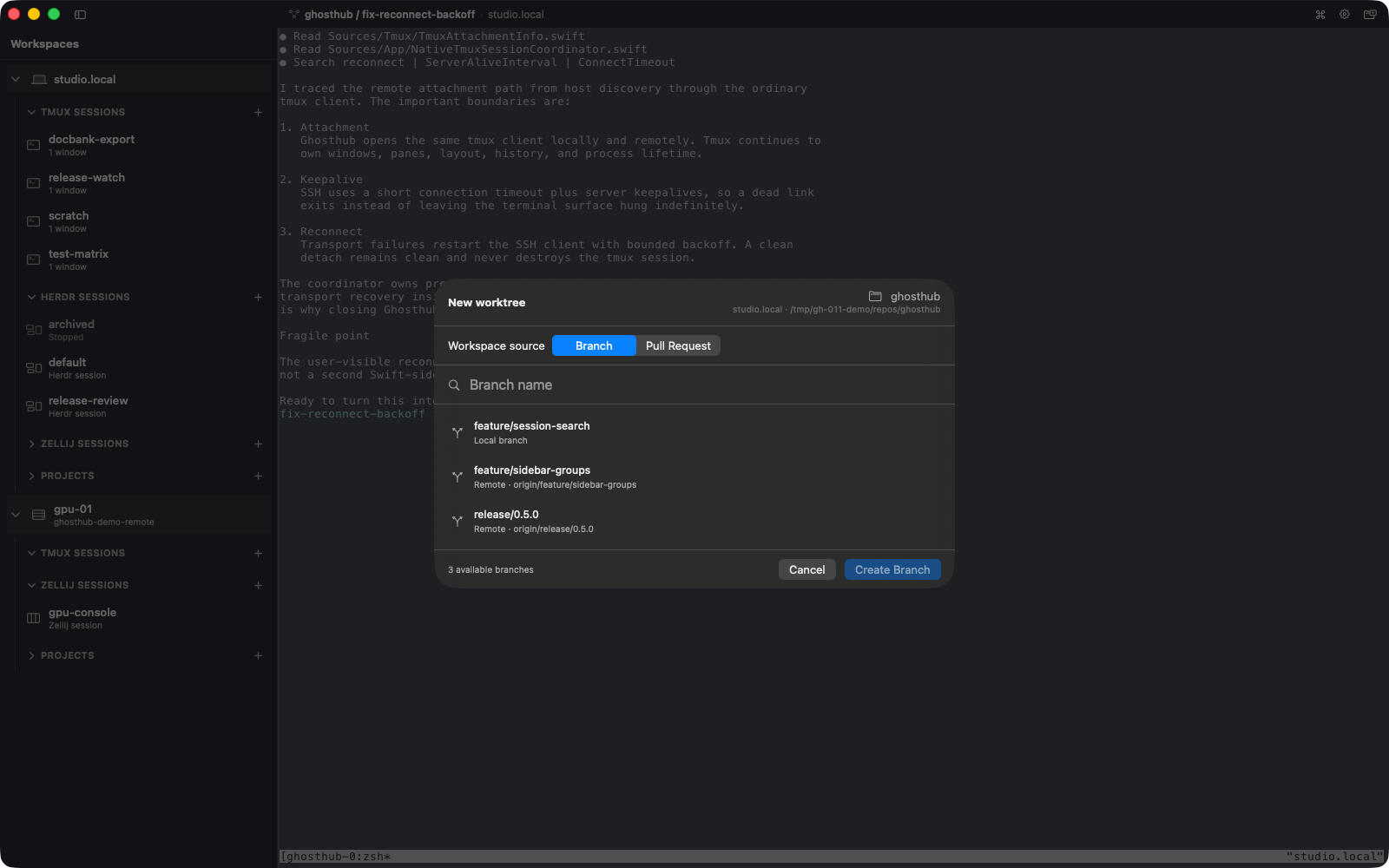
Import a GitHub pull request
Pull-request import requires the GitHub CLI and Git 2.42.0 or newer on the macOS or Linux host that contains the project. For native Windows hosts, it requires Git for Windows 2.53.0.windows.3 or newer. Install these tools on the project host, even when Ghosthub runs on another Mac.
On that host:
For an HTTPS Git remote, Git authentication must also work there. GitHub CLI can configure itself as the credential helper:
Then select the project, press Shift+Cmd+N, choose Pull Request, and search for an open pull request. Ghosthub asks kwt to import it and selects the resulting worktree session.
Remove a worktree
Hover over a non-primary worktree and select the ×, or Control-click its row and choose Remove Worktree…. After you confirm the exact worktree and host, Ghosthub:
- ends that worktree's verified live tmux session when necessary; and
- asks kwt to remove the checkout.
The Git branch is kept. If the checkout is already absent, Ghosthub skips the redundant filesystem removal but still reconciles the exact live session covered by the confirmation. If the worktree or session changes while the confirmation is open, Ghosthub stops and presents the current removal details for fresh confirmation instead of continuing automatically.
If a worktree has uncommitted changes, review the warning before confirming forced removal. This discards those changes. If there are too many changed files to list, Ghosthub says the inspection is incomplete and still requires that explicit confirmation.
After removal, the owning project remains selected. Ghosthub does not select another worktree or open its tmux session on your behalf.
Rearrange worktrees
Drag worktrees within a project to set their display order. The insertion line shows the destination. This changes Ghosthub's navigation only; it does not rename or reorder anything in Git, kwt, or tmux.